
As an employer with ASRS-participating members, you play a crucial role in ensuring compliance and giving eligible new hires all the information and tools they need. One of the most important, but sometimes overlooked, items is the 65+ Membership Waiver. Understanding this waiver, and having the right processes in place, benefits both your organization and your employees.
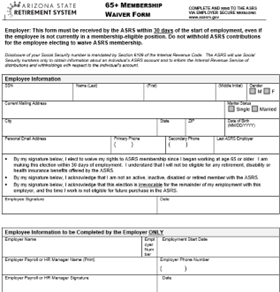
What Is the 65+ Membership Waiver?
• The 65+ Membership Waiver allows new employees to opt out of ASRS membership if they are at least 65 years old on their first day of employment, are not already an ASRS member, and have no prior ASRS service. A.R.S § 38-727(A)(8).
• The waiver election must be made in writing using the official form, and ASRS must receive the completed form within 30 days of the start date. R2-8-1002.
• Once made, this waiver is irrevocable for that period of employment and means the employee waives all rights to retirement, disability, or health insurance benefits through ASRS for that job.
• The waiver only applies to that specific employment period and employer. If the employee later works for another ASRS employer (or is rehired), a new waiver is required
Tools & Resources to Support You
As an ASRS employer, you have a suite of resources at your fingertips.
Check Member Eligibility Tool
An online application that lets you verify whether a new hire meets the waiver criteria. You can check if they are currently in the ASRS system (active, inactive, or retired) through your employer portal. For a refresher on how to use the tool, and what the different results mean, check out this article: How to Check Membership Eligibility
65+ Membership Waiver Form
Available in the secure employer website (Forms & Packets → Employer Forms), this is the official form required to record the waiver.
Employer Reference Materials Page
The ASRS website offers a robust Employer Reference Materials section, including:
• The Employer Manual (current as of March 2024)
• Employer user guides (online enrollment, contribution reporting, secure messaging, etc.)
• Training materials, videos, and “Basics for Employers” courses covering membership, eligibility, and enrollment.
Best Practices & Friendly Tips for Employers
• Train Human Resources/Payroll teams: Ensure your team knows when and how to offer the waiver and that they understand the 30-day submission window.
• Use secure messaging: Submit completed waiver forms through the ASRS employer secure messaging system. Do not mail or fax.
• Document everything: Keep a copy of the completed waiver in your records and note the date it was submitted to ASRS.
• Incomplete forms: Incomplete forms will be returned, and you will be given 14 days to resubmit the completed form. If a completed form is not received after 14 days, we have to reject the waiver.
• Include the waiver in your onboarding: Add it to your new-hire packet for anyone aged 65+ when they start. We highly encourage using the Check Member Eligibility tool prior to providing the waiver, to avoid unnecessary work for both ASRS and the Employer
Reach Out If You Have Questions
We encourage you to explore the Employer Reference Materials page on the ASRS website. It’s full of up-to-date guides, manuals, and tools to support your role.
If something isn’t clear or if you’re unsure whether a specific employee qualifies, please reach out to the Employer Relations team via:
• Chat (from your employer secure portal)
• Secure Message (within the portal)
We are ready to help you navigate any situation and ensure you stay in compliance.
By proactively managing the 65+ Membership Waiver, you are not just checking a box, you are honoring ASRS rules, avoiding potential liability, and ensuring that eligible new hires make informed decisions. It is a simple policy, but one with real significance, and your role is vital to making sure it works smoothly for everyone.

